ssh小技巧
ssh的一些小技巧!
ssh小技巧
ssh端口转发
通过VSCode
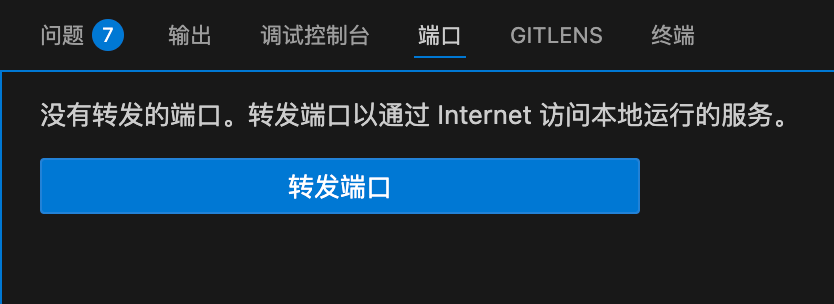
直接在VSCode中进行设置即可。注意,VSCode中只能进行LocalForward,即只能让本地设备访问到云服务器的端口。如果想让云服务器访问本地端口,例如让云服务器流量流过本地,就必须使用ssh配置文件。
通过ssh配置文件
打开~/.ssh/config即可进行如下配置
1
2
3
4
5
6
7
Host 2026-1-6
  HostName connect.cqa1.seetacloud.com
  Port 10197
  User root
  LocalForward 8045 127.0.0.1:8045
  RemoteForward 17890 127.0.0.1:7890
  IdentityFile ~/.ssh/id_ed25519
其中Host是别名,RemoteFormard是让云端服务器可以访问本地端口,IdentitiFile是设置好的密钥,让ssh登录时不用反复输入密码。
警告
千万不要将云端和本地的代理端口设置为同一个,否则会进入死循环!
免密登录–配置密钥
首先在本地创建密钥,然后将公钥发给云服务器,在ssh中设置密钥,以后登录就不需要输入密码啦
step1: 创建密钥:
格式为:ssh-keygen -t ed25519 -C "该密钥的注释" 回车后填写地址、密钥的密码即可。可以不给密钥设置密码,这样免密登录最方便。
1
2
3
4
5
6
7
8
9
10
11
12
13
14
15
16
17
18
19
20
21
22
23
24
25
zhengcaiyi@zhengcaiyideMacBook-Pro .ssh % ssh-keygen -t ed25519 -C "该密钥的注释"
Generating public/private ed25519 key pair.
Enter file in which to save the key (/Users/zhengcaiyi/.ssh/id_ed25519): /Users/zhengcaiyi/.ssh/test
Enter passphrase for "/Users/zhengcaiyi/.ssh/test" (empty for no passphrase):
Enter same passphrase again:
Your identification has been saved in /Users/zhengcaiyi/.ssh/test
Your public key has been saved in /Users/zhengcaiyi/.ssh/test.pub
The key fingerprint is:
SHA256:2qX3bMWuB1o1e2RDFubIywzfI3nmrUutIuzQ3bv5v4s 该密钥的注释
The key's randomart image is:
+--[ED25519 256]--+
|               o.|
|            . +o |
|           . oo. |
|            = *.o|
|        S .  X X.|
|       o + .o.O.+|
|      . +.oo.+ooo|
|         o+oo.+= |
|         ..o+EB**|
+----[SHA256]-----+
zhengcaiyi@zhengcaiyideMacBook-Pro .ssh % ls
code_gitpod.d	id_ed25519	known_hosts	test
config		id_ed25519.pub	known_hosts.old	test.pub
zhengcaiyi@zhengcaiyideMacBook-Pro .ssh %
其中test是私钥,test.pub是公钥
Step2: 上传密钥
格式:ssh-copy-id -i ~/.ssh/test.pub user@server_ip
这一步会先连接云服务器,输入服务器的密码即可
Step3: 配置~/.ssh/config
1
2
3
4
5
6
7
Host 2026-1-6
  HostName connect.cqa1.seetacloud.com
  Port 10197
  User root
  LocalForward 8045 127.0.0.1:8045
  RemoteForward 17890 127.0.0.1:7890
  IdentityFile ~/.ssh/test
在IdentityFile中填入私钥地址即可
一些细节
- 设置密钥时有一个
-C参数,即为密钥生成评论。这是因为默认的密钥文件名是id_ed25519,为了区分它们,可以加入不同的commet。
1
2
3
4
zhengcaiyi@zhengcaiyideMacBook-Pro .ssh % cat ~/.ssh/id_ed25519.pub
ssh-ed25519 AAAAC3NzaC1lZDI1NTE5AAAAIGdLKYDHg5rZl3g5vzrJ2TGYPyJJXN/zgqhIkJpPLYSv zhengcaiyi@zhengcaiyideMacBook-Pro.local
zhengcaiyi@zhengcaiyideMacBook-Pro .ssh % cat ~/.ssh/test.pub
ssh-ed25519 AAAAC3NzaC1lZDI1NTE5AAAAINjaak2FALytZ+g3OHT320GFJGpvHmMOqlcTZ9YqTwnH 该密钥的注释
密钥id_ed25519没有设置comment,于是显示默认comment:用户名@主机名;密钥test设置了comment,所以显示出来了。
- 密钥有很多加密规则,使用
-t参数进行设置,默认是ed25519。 - 密钥的权限必须是600,即只有用户可以读写
1
2
3
4
5
6
7
8
zhengcaiyi@zhengcaiyideMacBook-Pro .ssh % ls -l test
-rw-------  1 zhengcaiyi  staff  411 Jan 31 17:02 test
zhengcaiyi@zhengcaiyideMacBook-Pro .ssh % chmod 644 test
zhengcaiyi@zhengcaiyideMacBook-Pro .ssh % ls -ls test
8 -rw-r--r--  1 zhengcaiyi  staff  411 Jan 31 17:02 test
zhengcaiyi@zhengcaiyideMacBook-Pro .ssh % chmod 600 test
zhengcaiyi@zhengcaiyideMacBook-Pro .ssh % ls -ls test
8 -rw-------  1 zhengcaiyi  staff  411 Jan 31 17:02 test
初始状态下密钥权限就是600。
安装codex
-
安装nvm (node version manager):
curl -o- https://raw.githubusercontent.com/nvm-sh/nvm/v0.39.7/install.sh | bash -
安装最新的LTS:
nvm install --lts -
安装codex:
npm install -g @openai/codex
本文由作者按照
CC BY 4.0
进行授权