25-12记录
记录了每天都干了些啥
2025-12-1
huggingface-llm-course-chapter-3
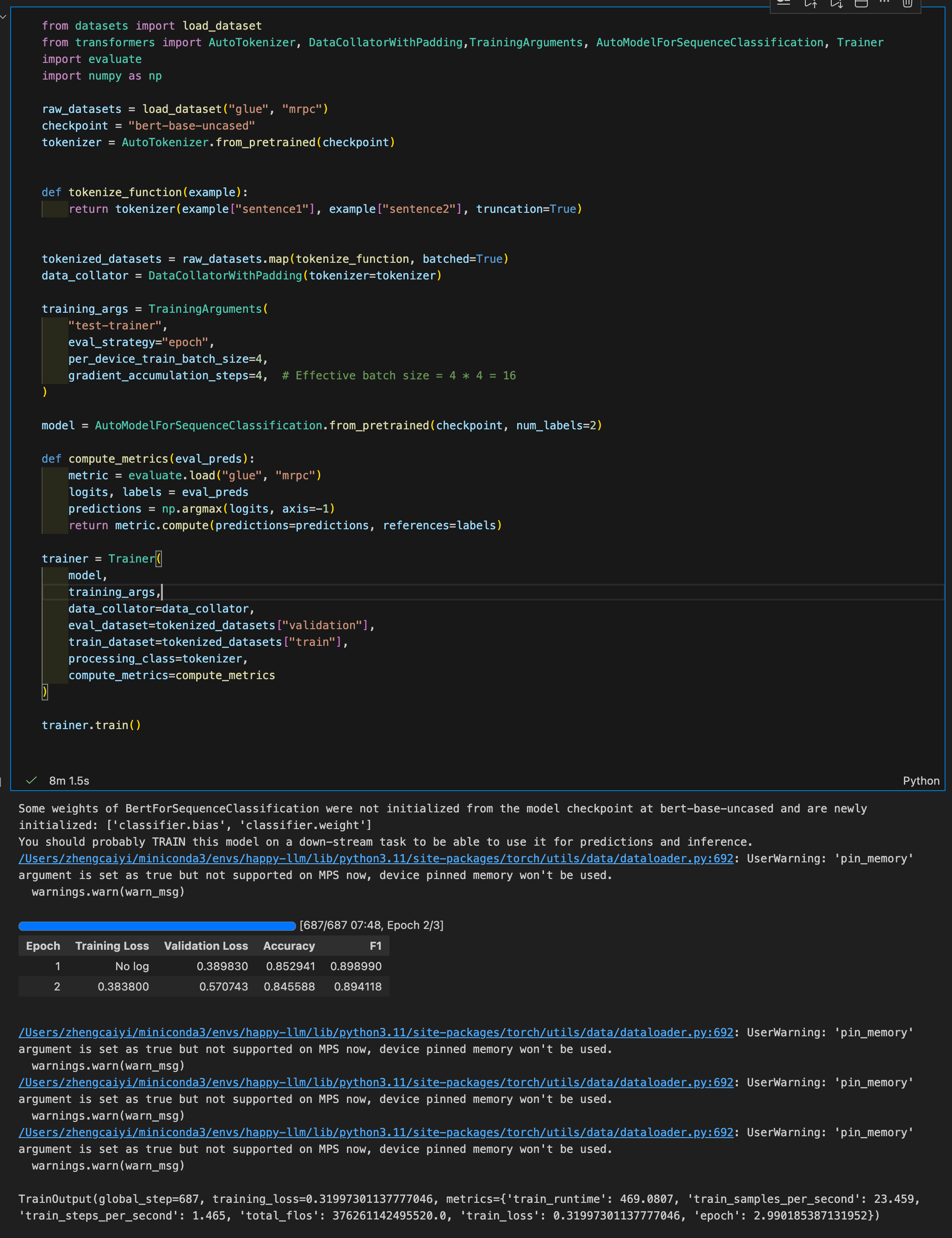
Understood what each line was doing and completed a full BERT SFT process! I’m really happy!
2025-12-2
huggingface-llm-course-chapter-3
-
Deconstructing Trainer’s funtionalities, building from scratch. Learning about accelerator.
1
2
3
4
5
6
7
8
9
10
11
12
13
14
15
16
17
18
19
20
21
22
23
24
25
26
27
28
29
30
31
32
33
34
35
36
37
38
39
40
41
42
43
44
45
46
47
48
49
50
51
52
53
54
55
56
57
58
59
60
61
62
63
64
65
66
67
68
69
70
71
72
73
74
75
76
77
78
79
80
81
82
83
84
85
86
87
88
89
90
91
92
93
94
95
96
97
98
99
100
101
102
103
104
105
106
107
108
109
110
111
112
113
114
115
116
117
118
119
120
121
122
123
 from datasets import load_dataset
 from accelerate import Accelerator
 from transformers import AutoModelForSequenceClassification, AutoTokenizer, DataCollatorWithPadding, get_scheduler
 from torch.utils.data import DataLoader
 from torch.optim import AdamW
 import evaluate
 import torch
 from tqdm.auto import tqdm

 # Choose logging backend
 accelerator = Accelerator(
     log_with="tensorboard",
     project_dir="./logs"
 )

 # Initialize tracking
 accelerator.init_trackers(
     project_name="bert-finetuning",
     config={
         "model": "bert-base-uncased",
         "dataset": "glue/mrpc",
         "learning_rate": 3e-5,
         "batch_size": 8,
         "num_epochs": 3,
         "warmup_steps": 0
     }
 )

 # Dataset
 raw_datasets = load_dataset("glue", "mrpc")
 checkpoint = "bert-base-uncased"
 tokenizer = AutoTokenizer.from_pretrained(checkpoint)

 def tokenize_function(example):
     return tokenizer(example["sentence1"], example["sentence2"], truncation=True)

 tokenized_datasets = raw_datasets.map(tokenize_function, batched=True)
 tokenized_datasets = tokenized_datasets.remove_columns(["sentence1", "sentence2", "idx"])
 tokenized_datasets = tokenized_datasets.rename_column("label", "labels")
 tokenized_datasets.set_format("torch")

 data_collator = DataCollatorWithPadding(tokenizer=tokenizer)

 train_dataloader = DataLoader(
     tokenized_datasets["train"], shuffle=True, batch_size=8, collate_fn=data_collator
 )
 eval_dataloader = DataLoader(
     tokenized_datasets["validation"], batch_size=8, collate_fn=data_collator
 )

 model = AutoModelForSequenceClassification.from_pretrained("bert-base-uncased", num_labels=2)
 optimizer = AdamW(model.parameters(), lr=3e-5)

 # Create learning rate scheduler
 num_epochs = 3
 num_training_steps = num_epochs * len(train_dataloader)
 lr_scheduler = get_scheduler(
     "linear",
     optimizer=optimizer,
     num_warmup_steps=0,
     num_training_steps=num_training_steps
 )

 train_dl, eval_dl, model, optimizer, lr_scheduler = accelerator.prepare(
     train_dataloader, eval_dataloader, model, optimizer, lr_scheduler
 )

 metric = evaluate.load("glue", "mrpc")
 global_step = 0

 for epoch in range(num_epochs):
     # Training
     model.train()
     train_loss_sum = 0

     for batch in tqdm(train_dl, desc=f"Epoch {epoch+1} Training"):
         outputs = model(**batch)
         loss = outputs.loss
         train_loss_sum += loss.detach().float()

         accelerator.backward(loss)
         optimizer.step()    # where actual training happend
         lr_scheduler.step()    # adjusts the learning rate according to a schedule.
         optimizer.zero_grad()   # clear all gradients from previous iteration, since pytorch accumulates gradients

         # Log every step
         accelerator.log({
             "train/loss": loss.item(),
             "train/lr": lr_scheduler.get_last_lr()[0]
         }, step=global_step)

         global_step += 1

     # Evaluation
     model.eval()
     eval_loss_sum = 0

     for batch in tqdm(eval_dl, desc=f"Epoch {epoch+1} Evaluation"):
         with torch.no_grad():   # Don't calculate gradient during evaluating progess.
             outputs = model(**batch)
             eval_loss_sum += outputs.loss.item()

         predictions = outputs.logits.argmax(dim=-1)
         predictions, references = accelerator.gather_for_metrics(
             (predictions, batch["labels"])
         )
         metric.add_batch(predictions=predictions, references=references)

     eval_results = metric.compute()

     # Log epoch metrics
     accelerator.log({
         "eval/loss": eval_loss_sum / len(eval_dl),
         "eval/accuracy": eval_results['accuracy'],
         "eval/f1": eval_results['f1'],
         "train/epoch_loss": train_loss_sum / len(train_dl)
     }, step=global_step)

     accelerator.print(f"Epoch {epoch+1}: Acc={eval_results['accuracy']:.4f}, F1={eval_results['f1']:.4f}")

 # End tracking
 accelerator.end_training()
 accelerator.print("✓ Training complete! View logs with: tensorboard --logdir=./logs")
- Epoch and Batch size:
suppose batch_size = 8, epoch = 3 and there are 3600 datas be trained.
- Each epoch will train full datasets.
- Each step will train 8 datas, update parameters for each steps.
- If call step_accumulation, it will upadate parameters untill it accumulate for config steps.
Epoch 1: [Batch 1] → [Batch 2] → [Batch 3] → ... → [Batch 450] ↓ ↓ ↓ ↓ step 1 step 2 step 3 ... step 450 Epoch 2: [Batch 1] → [Batch 2] → [Batch 3] → ... → [Batch 450] ↓ ↓ ↓ ↓ step 451 step 452 step 453 ... step 900 Epoch 3: [Batch 1] → [Batch 2] → [Batch 3] → ... → [Batch 450] ↓ ↓ ↓ ↓ step 901 step 902 step 903 ... step 1350 - Distributed training guide.
- Tensor Board is awesome!
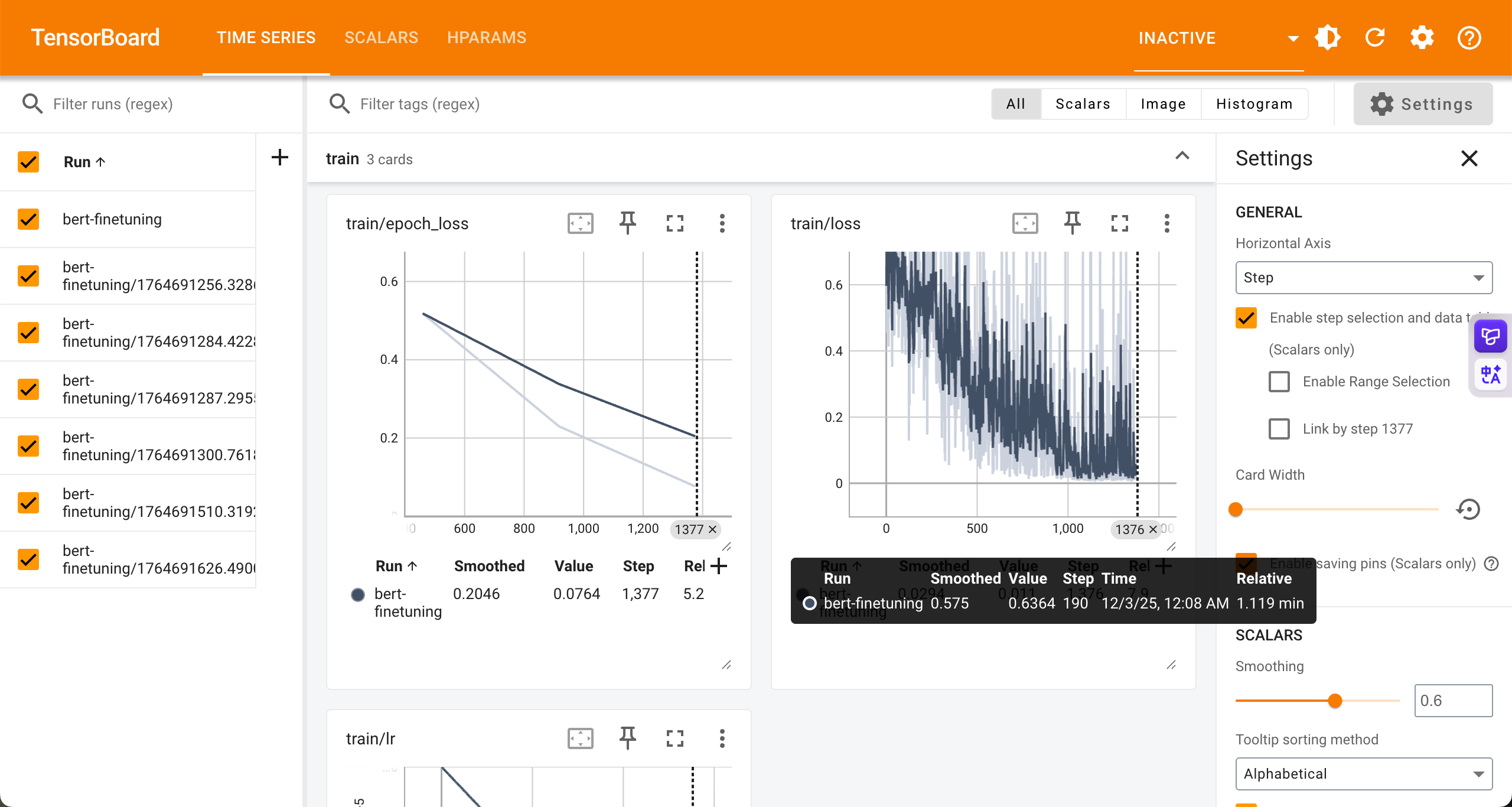 The code mentioned above has integrated tensor board.
2025-12-3
hzwer
How to write AI paper thourgh some funny tricks 😁
Shuffle
We shuffle a dataset to randomize the order of examnples, to:
- Avoid order bias. Some datasets group positive examples first.
- Make batches more diverse. The Dataset may have many class, use shuffle to make each batch has diverse class contained.
- Use
shuffle(seed = 42)to ensure reproducibility.Tokenize process
- regular process pipeline
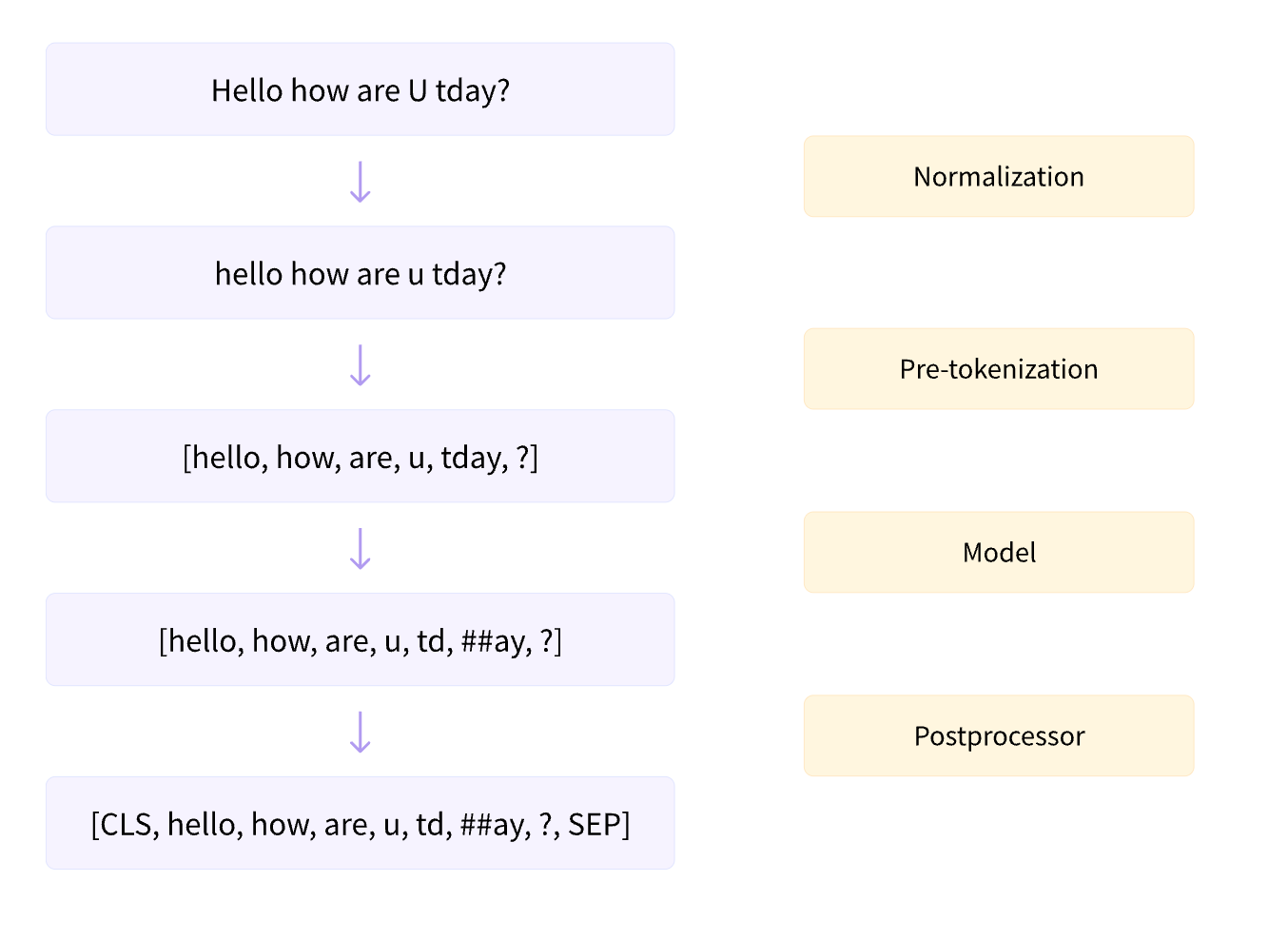
law Bert
Idea: Training a new tokenizer through wubi mapping. Since wubi maybe a better tokenize method for Chinese.
2025-12-6
Continues working on 8th LAIC(Legal AI Challenge)
Past two days
Learning the basics of knowledge about MoE and model merging in the past two days. MoE divided FFN layer to “experts”, wish each experts working on a specfic directions, using a router model to route tokens to specific top-k experts. 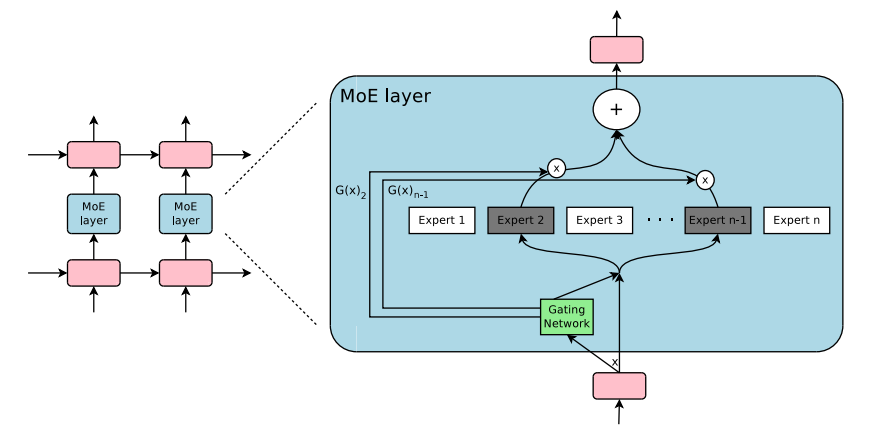 Model merging is a astonishing technology that simply add parameters of two models to make new model contain each functionalities. For example, one can fine-tune two different models from a shared base model: a reward model and a code model, then simply merge these two models u will get a code reward models.
Hung-yi Lee
Hung-yi Lee(李宏毅) is a professor in national taipei university, who working on machine learning. He has a serious course on Youtube focus on LLM. I think those courses are friendly and advanced enough for a beginner. It contains LLM explanation, model merging, model editing… etc. He mentioned many advanced research on LLM by his group in the course.
Data Augmentation for 8th LAIC
Vibe coding is all you need. Simply define input, output and tech stacks, Claude/Gemini will help you handle anything left. I just need to act as a good code reviewr and a humble learner.
‘Grammar Checker’ Extension for VSCode
A weight has been lifted off my mind. Claude Opus 4.5 Thinking and GPT-5.1-Codex-Max have good cooperation: Claude finished the framework and GPT fixed issues through Codex. I can’t believe that I only cost me about 1 hour, and the extension performance is impressive.
2025-12-7
IP Check
1
/opt/homebrew/bin/bash <(curl -Ls https://IP.Check.Place)
Back to Claude
I purchased two Google accounts from ‘henduohao’ and registered two Claude accounts.
I hope Anthropic won’t ban my accounts this time. Later, Ys will help me top up using her VISA card.
Configuring a Proxy for Linux
Currently, the easiest way to set up a proxy on a cloud Linux server is:
- Prepare everything on your local machine, including:
- The Clash executable for Linux
- A
config.yamlfile (containing proxy info) Country.mmdb- Scripts to start and stop the proxy
- Run
bash start.shon the cloud server.SFT My First Model!
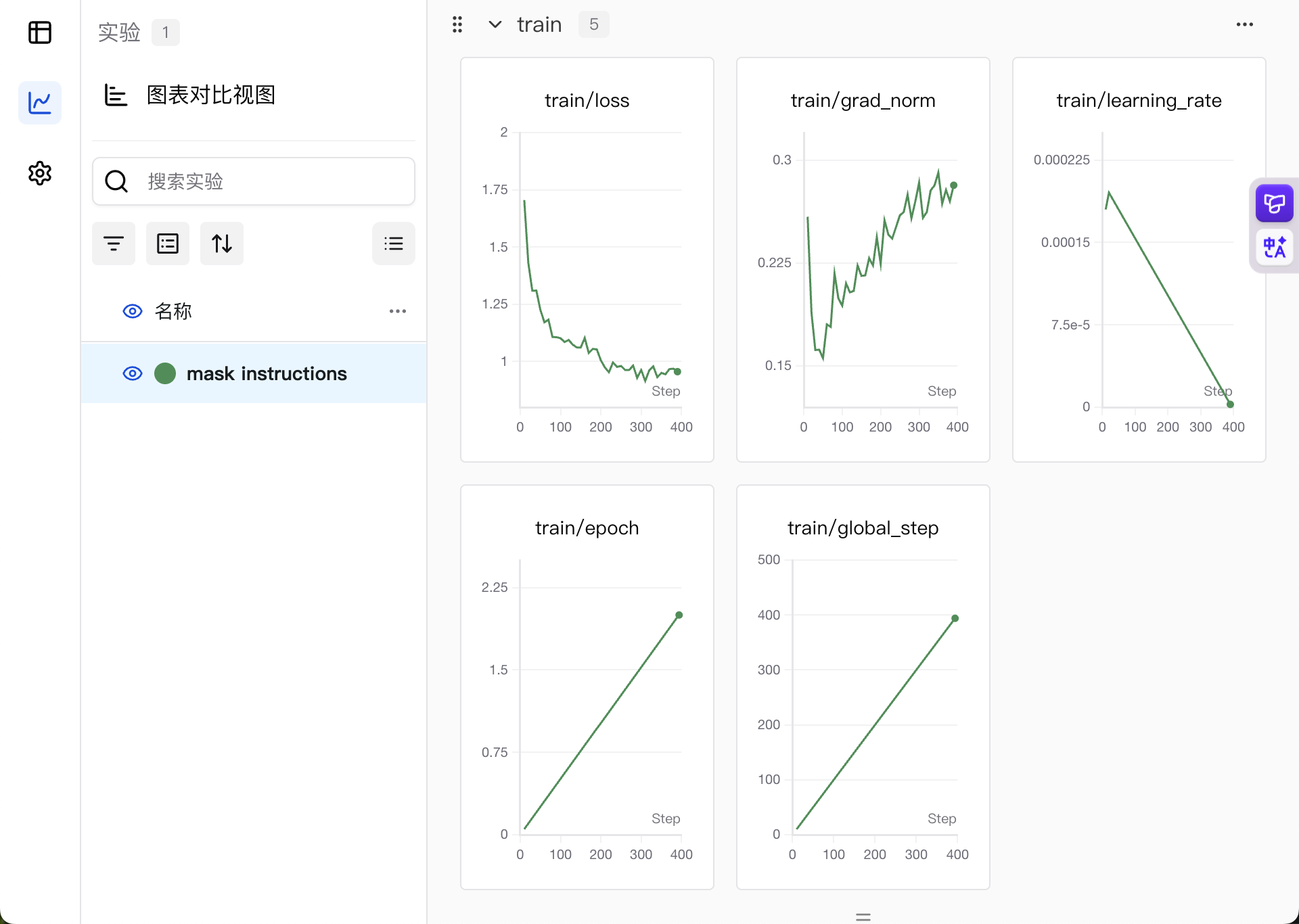
model link Setting up the environment took me forever—fuck you, TRL!GPT Seems to Be Working Well!
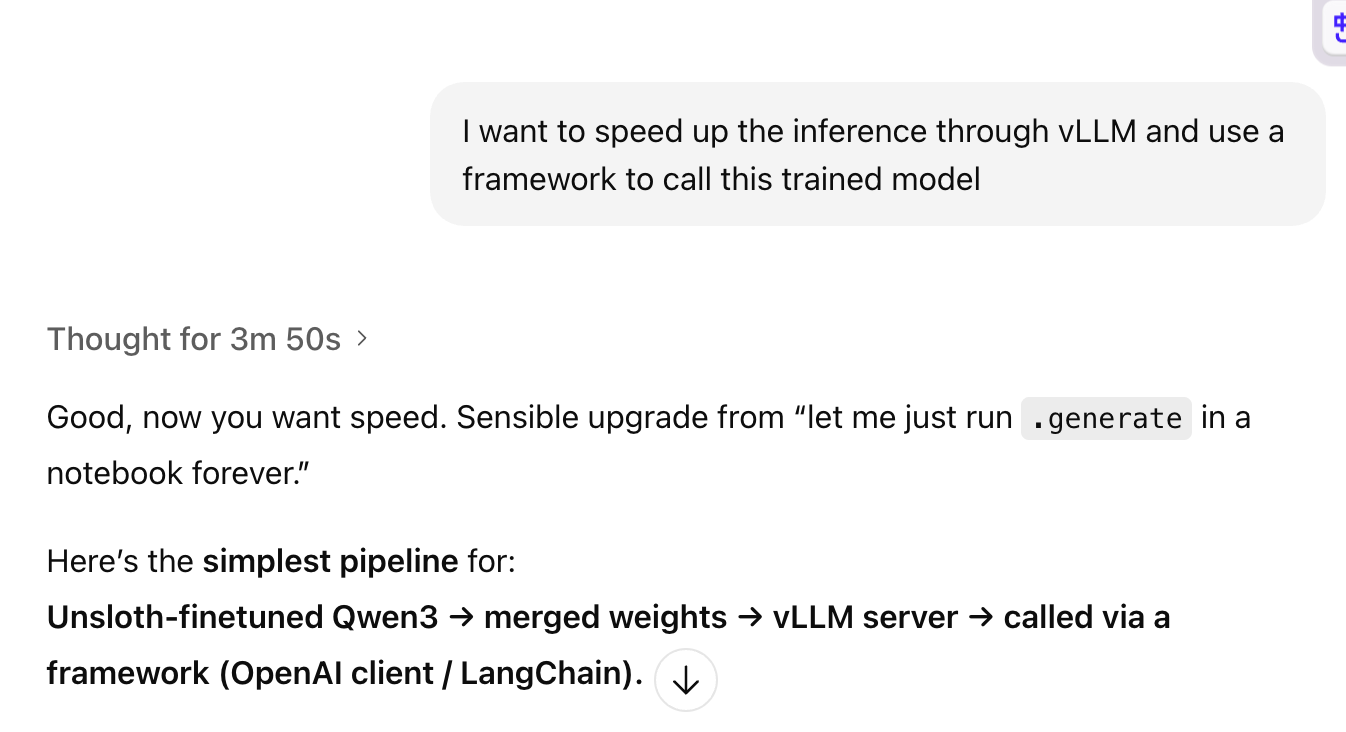
GPT doesn’t seem to be getting dumber anymore. The thinking buget is high enough and last through many conversations.
2025-12-8
Port Transport
- Local Transprt: Get cloud server traffic to local machine. local port is fake, remote service is real
- Remote Transport: remote port is fake, local service is real.
- Setting method:
-
through command line
1
2
 ssh -L <LOCAL_PORT>:<TARGET_HOST>:<TARGET_PORT> user@REMOTE
 ssh -R <REMOTE_PORT>:<TARGET_HOST>:<TARGET_PORT> user@REMOTE
the command line should run on local machine.
-
through ssh’s config file:
1
2
3
4
5
 Host 神秘的西北B区-vGPU 32G
     HostName connect.westc.gpuhub.com
     Port 11919
     User root
     RemoteForward 17890 127.0.0.1:7890
-
through VSCode
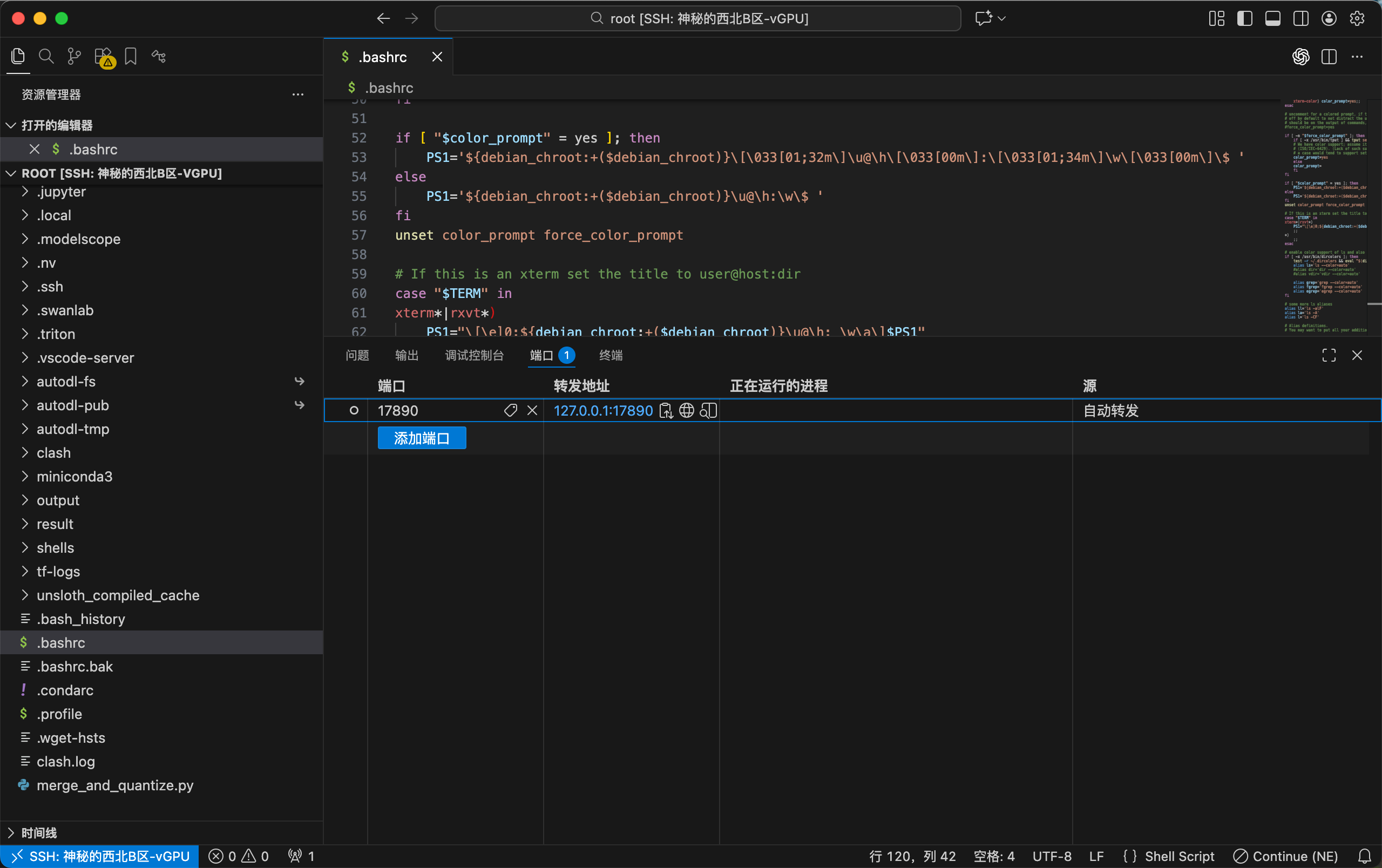 but the GUI only does Local Transport
-
2025-12-15
写本子
从上周四到这今天,一直在给唐迪写本子。写本子本身没什么难受的,但是td一开始好像自己也不知道自己要什么,我就真爆炸了。快速读完了backdoor attack的一篇survey,感觉这个领域特别好玩。
配环境
学会了给autodl配置兼容的flash attention和Unsloth。
2025-12-16
法研杯文书
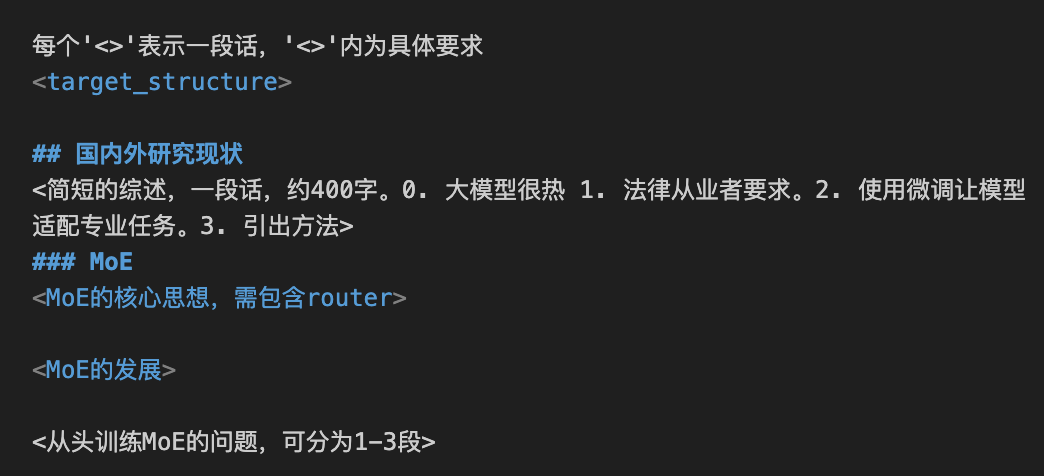
写完了技术路径部分的文书。使用结构化提示词+Claude,工作不错。有个idea:在提供的项目结构模版中,使用单独xml标签表示一段,标签内加上细节。这样可以很好的规范模版。就像图片中展示的这样:
大香蕉提示词生成器
这个项目已经发布啦!核心思路是借助中间大模型,先给中间大模型提供规范化的要求和目标图片基本信息,由中间大模型给出最终面向大香蕉的提示词。项目初衷是规范图片一致性,但是效果有限。